> For the complete documentation index, see [llms.txt](https://docs.g-iot.io/llms.txt). Markdown versions of documentation pages are available by appending `.md` to page URLs; this page is available as [Markdown](https://docs.g-iot.io/data-management-and-eu-data-act-compliance/download-data-via-api.md).
# Download Data via API
The GIoT platform provides secure **API-based data export** to comply with the **EU Data Act**.\
This method allows you to **retrieve all your device data programmatically** in a structured format, enabling seamless integration with third-party systems or migration to other platforms.\
Follow the upcoming steps to generate your **API token** and access your data safely.
Only users with **Super Admin privileges** or those with **explicitly granted permissions** can access this section.
### **Steps to Export Data via API**
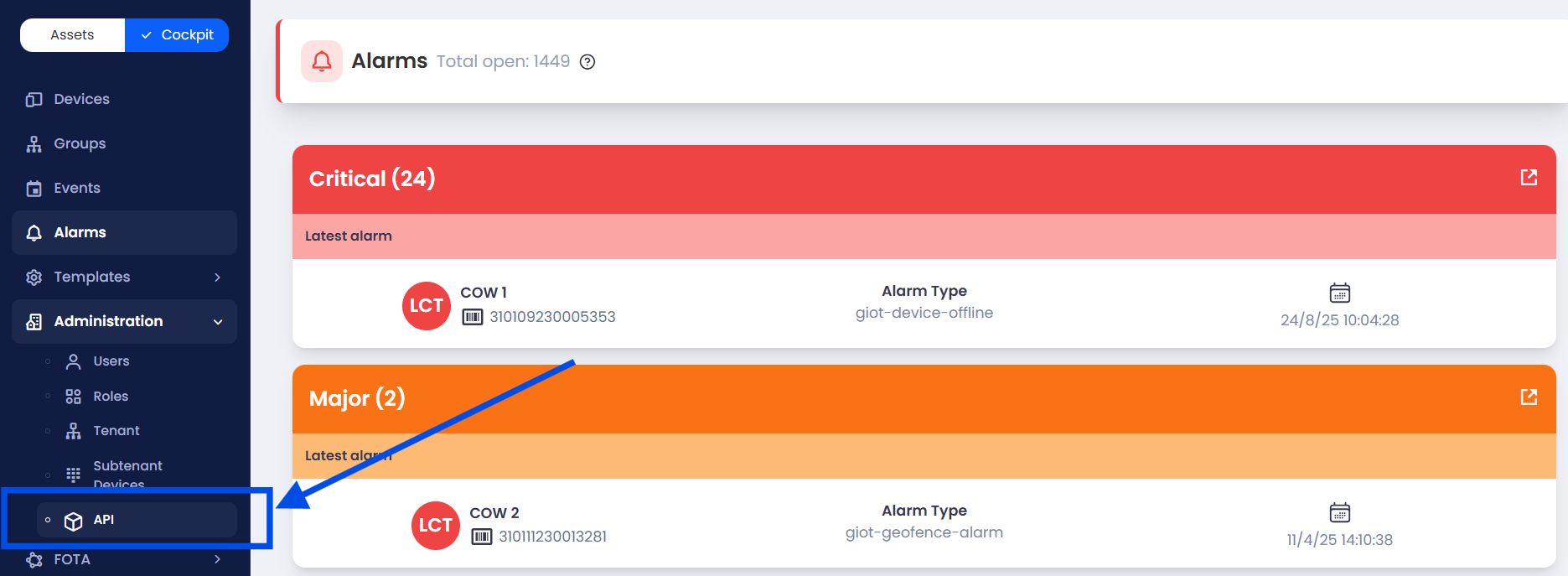
1. **Access the API Documentation:**\
From the **Cockpit menu**, navigate to **Administration** and click on **API**.\
A new browser tab will open directly on **Swagger**, showing the **GIoT Public API Documentation**.
2. **Locate the Relevant API Endpoint:**\
Browse through the **organized API sections** to find the endpoints for data export.\
Examples include:
* **Devices** → Export device lists and configurations.
* **Rules** → Retrieve configured rules and thresholds.
* **Alarms** → Download full alarm history.
* **Measurements** → Export collected measurement data.
3. **Select the API Method:**\
Click on the desired endpoint and choose the **GET** or **POST** method depending on the data you want to export.
4. **Insert Required Parameters:**\
If the endpoint requires parameters (e.g., **Tenant ID**, **Device ID**, or **date ranges**), insert the necessary values in the dedicated fields.
5. **Execute the Request:**\
Click on **“Try it out”** to execute the API request directly in Swagger.\
The data will be displayed in the **Response Body** below.
6. **Download or Save Data:**\
Copy the returned data or download it in **JSON** format. You can convert this into **CSV** or other formats if needed.
{% hint style="info" %}
API endpoints are **grouped by function** and include **detailed descriptions** to guide you. This allows you to export all relevant information — devices, alarms, measurements, and more — directly from the platform, as required by the **EU Data Act**.
{% endhint %}
---
# Agent Instructions
This documentation is published with GitBook. GitBook is the documentation platform designed so that both humans and AI agents can read, navigate, and reason over technical content effectively. Learn more at gitbook.com.
## Querying This Documentation
If you need additional information that is not directly available in this page, you can query the documentation dynamically by asking a question.
Perform an HTTP GET request on the current page URL with the `ask` query parameter, and the optional `goal` query parameter:
```
GET https://docs.g-iot.io/data-management-and-eu-data-act-compliance/download-data-via-api.md?ask=&goal=
```
`ask` is the immediate question: it should be specific, self-contained, and written in natural language.
`goal` is optional and describes the broader end goal you are ultimately trying to accomplish on behalf of the user. GitBook uses it to tailor the answer towards what is most useful for that goal.
The response will contain a direct answer to the question and relevant excerpts and sources from the documentation.
Use this mechanism when the answer is not explicitly present in the current page, you need clarification or additional context, or you want to retrieve related documentation sections.